What Happens When a Hard Drive PCB Stops Working (Symptoms, Causes, & Recovery Guide)
When a computer suddenly fails to detect a storage drive, or an external drive refuses to power on, the underlying issue often traces back to a single component: the Printed Circuit Board (PCB). Positioned on the exterior underside of a hard disk drive (HDD), the PCB acts as the primary nerve center governing power, hardware communication, and motor operations.
Understanding what happens when a hard drive PCB stops working helps distinguish between simple board-level electrical failures and catastrophic internal mechanical damage, guiding safe data extraction steps.
Overview: What Is a Hard Drive PCB and What Is Its Role?
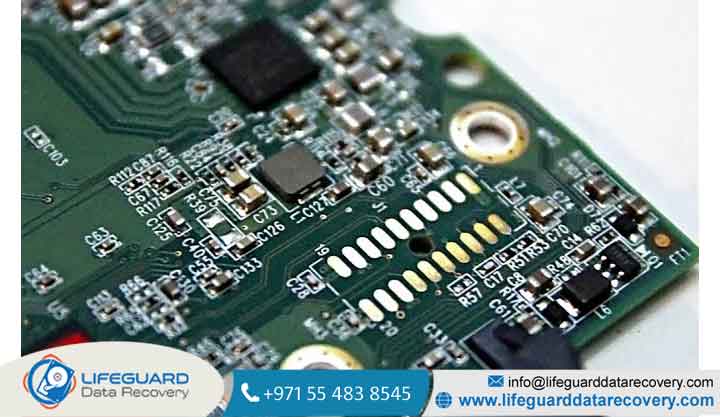
The Printed Circuit Board (PCB) commonly called the logic board is the green or blue board attached to the bottom exterior of a 3.5-inch desktop or 2.5-inch laptop hard drive. It acts as the primary interface bridge between your computer’s operating system and the delicate mechanical components inside the drive’s sealed enclosure (the Hard Disk Assembly, or HDA).
The PCB manages several vital system functions:
-
Power Distribution: Regulates incoming 12V and 5V power rails from the power supply unit (PSU).
-
Motor Control: Directs power to the spindle motor to spin magnetic platters up to operating speeds
-
Signal Translation: Converts digital host commands into high-frequency analog signals that drive read/write head actuators across platter surfaces.
-
Firmware Execution: Initializes drive adaptives stored in onboard memory chips during system boot up.
What Physically Happens When a Hard Drive PCB Fails?
When hard drive circuit board failure occurs, the communication chain between the computer host and the internal magnetic media breaks instantly. The specific symptoms depend on which electronic component on the board has shorted or degraded.
Power Controller & TVS Diode Blowouts (No-Power State)
Transient Voltage Suppressor (TVS) diodes sit near the power connector to protect delicate circuitry from incoming voltage spikes. When a power surge strikes, these diodes short-circuit deliberately to trip the power supply and block excess current. As a result, electrical current stops flowing entirely, rendering the drive completely inanimate.
Motor Driver IC Burnout (Drive Fails to Spin)
The motor driver Integrated Circuit (IC) often manufactured by smooth-power chips controls the precision spindle motor. If heat or voltage fluctuations destroy this chip:
-
Electrical current fails to reach the spindle motor windings.
-
Magnetic platters remain completely motionless.
-
The host system times out waiting for the drive to send a “ready” signal during POST (Power-On Self-Test).
Microprocessor & ROM Chip Malfunctions (Unrecognized Drive)
The main CPU (Microcontroller Unit) processes commands and accesses drive calibration parameters saved in the Read-Only Memory (ROM) chip. If power issues corrupt the ROM chip or damage the main controller, the drive may spin up physically, but it cannot pass drive identification parameters (such as model string, capacity, and firmware revision) back to the motherboard BIOS.
Failed Hard Drive PCB Symptoms: How to Identify Circuit Board Damage
Accurately diagnosing failed hard drive PCB symptoms prevents mistaking an electrical failure for internal mechanical head degradation.
Complete Absence of Power or Vibration (Silent Drive)
When connected to a known-working power source, the drive produces zero sound, zero vibration, and zero heat. Unlike a drive with stuck mechanical heads (which typically emits a faint humming or buzzing sound), a dead logic board leaves the unit completely inert.
Burning Smell, Scorch Marks, or Visible Component Cracks
Physical inspection of the exterior board reveals distinct signs of hard drive electronics failure:
-
A sharp, acrid ozone smell near the SATA power connector.
-
Blackened or scorched TVS diodes or smoothing capacitors.
-
Blistered, cracked, or cratered IC chip packages.
The Computer Struggles to Boot or Freezes During POST
A shorted board connected to a SATA or USB interface can pull down the host system’s power rail or flood the bus controller with garbled signals. This causes host computers to lock up indefinitely on the motherboard logo screen or experience delayed operating system boot cycles.
System Detects Incorrect Drive Capacity or Alien Characters
If the main controller chip functions partially but cannot read the 8-pin ROM adaptive chip, Disk Management or device utilities may display the drive with zero bytes of total storage or report random, garbled ASCII text in place of the manufacturer model string.
Primary Causes of Hard Drive Circuit Board Failure
Logic board components operate under tight voltage and thermal tolerances. Common triggers for hard drive PCB not working scenarios include:
Can You Fix or Replace a Dead Hard Drive PCB? (The Truth About Swapping)
In older hard drive models produced before the early fixing a dead board was often as simple as finding an identical donor hard drive, unscrewing the damaged board, and screwing on the donor PCB. On modern hard drives, direct board swapping almost never works and can lead to permanent data loss.
The Critical Role of Drive-Specific Adaptive Data & ROM Transfer
Every modern hard drive leaves the factory with unique micro-code adjustments stored inside an 8-pin EEPROM/ROM chip (or embedded directly within the main CPU). These parameters known as head adaptives account for microscopic mechanical variances in the alignment, resistance, and track pitch of the physical read/write heads inside that specific enclosure.
If you mount a donor PCB without transferring the original drive’s unique ROM chip:
-
The replacement board attempts to read platters using mismatched adaptive data.
-
The read/write heads sweep frantically across platter tracks searching for system area alignment, causing a distinct clicking sound.
-
Continued power cycles with mismatched adaptives cause physical read/write head damage or platter surface scratching.
Testing and Bypassing Blown TVS Diodes (Component Repair)
For basic circuit board failure caused solely by a minor surge, component-level repair may restore power:
-
Multimeter Check: Set a digital multimeter to diode test mode. Place probes across the 5V and 12V TVS diodes to test for continuity. A shorted diode reads near zero ohms in both directions.
-
Diode Removal: Technicians desolder or snip the shorted diode to break the short circuit, restoring power flow to the drive.
How Professionals Recover Files from Damaged Hard Drive PCBs
When component-level fixes fail, recovering data from a damaged logic board requires specialized hardware tools and cleanroom-grade surface-mount rework capabilities.
-
Hardware-Level Sector Imaging: The reassembled drive is connected to dedicated data recovery hardware platforms (such as PC-3000). These systems bypass standard operating system commands, control channel voltage parameters, and safely extract sector-by-sector disk images even if read stability is compromised.
Prevention Tips: Protecting Hard Drive Electronics from Failure
Protecting internal logic boards against premature component degradation involves simple operational precautions:
Frequently Asked Questions (FAQ)
Will swapping a hard drive PCB delete my data?
No. Your personal data is stored magnetically on the glass or aluminum platters sealed inside the upper drive chamber, not on the electronic PCB board itself. However, executing a swap incorrectly without transferring the unique adaptive ROM chip will prevent the drive from accessing that data.
How much does hard drive PCB repair or replacement cost?
Component-level PCB repairs or donor board transfers typically cost through specialized micro-soldering services. Full laboratory data recovery required if board failure caused secondary head damage or firmware corruption typically ranges depending on drive complexity.
Can I run a hard drive without a TVS diode after removing it?
Yes, but only temporarily to extract data. A TVS diode acts like an electrical fuse; removing a shorted diode restores the circuit path, but leaves the hard drive completely unprotected against any subsequent power surge.