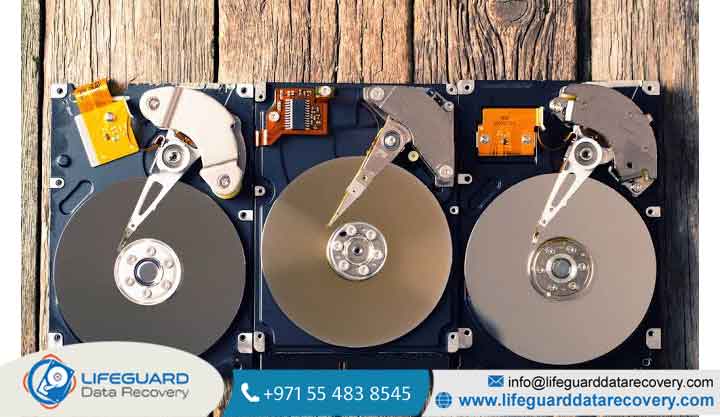
Data loss often feels like a sudden catastrophe, but traditional Hard Disk Drives (HDDs) rarely fail without cause or warning. Operating a mechanical storage device requires spinning aluminum, glass, or ceramic platters while magnetic read/write heads hover mere nano meters above the surface on a thin cushion of air.
With tolerances measured in micro-inches, mechanical, thermal, electrical, and logical wear naturally compound over time. Empirical telemetry from cloud storage providers like Back blaze (monitoring active drives) demonstrates an Annualized Failure Rate (AFR) hovering between for drives under five years of age, spiking significantly as drive populations exceed five years of service.
This comprehensive technical guide breaks down the core reasons for hard drive failure, early warning indicators, safe diagnostic procedures, and actionable steps to protect your critical data.
Understanding HDD Failure: How Mechanical Hard Drives Work & Why They Wear Out
Unlike Solid-State Drives (SSDs) that rely entirely on NAND flash memory cells and electronic controllers, a hard disk drive is an electro-mechanical assembly. Key moving components include:
-
Platters: Circular disks coated with a microscopic ferromagnetic layer where data bits reside.
-
Spindle Motor: The high-precision electric motor responsible for rotating platters at high speeds.
-
Read/Write Heads & Actuator Arm: The magnetic sensors that hover over platter surfaces to write and read data, positioned by a voice-coil actuator.
-
Printed Circuit Board (PCB): The external controller board managing data transfer, power delivery, and drive microcode execution.
Hardware reliability typically follows the engineering “bathtub curve”:
-
Infant Mortality: Early failures within the first few months caused by factory defects or assembly errors.
-
Normal Operating Life: Low, stable failure rates during middle age (1–4 years).
-
Wear-out Phase: Exponentially increasing failures after 5+ years of continuous service as mechanical bearings, head flex cables, and magnetic layers degrade.
Understanding these mechanics helps clarify why specific HDD failure causes occur and how to spot initial common hard drive problems.
Physical & Mechanical Causes of Hard Drive Failure
Mechanical degradation accounts for the vast majority of irreversible data destruction. Physical component failures often require cleanroom environment interventions for recovery.
Head Crashes & Read/Write Head Failure
A head crash is one of the most destructive causes of hard drive failure. It occurs when the floating slider carrying the read/write head loses its air bearing aerodynamic cushion and makes physical contact with the spinning platter.
-
Impact: The contact strips away the magnetic coating, producing metallic debris inside the sealed drive chamber.
-
Escalation: This fine dust acts as an abrasive, causing a domino effect of secondary head crashes and permanently destroying unrecoverable data.
Spindle Motor & Bearing Wear
HDDs rely on Fluid Dynamic Bearings (FDB) or ball bearings to maintain concentric platter rotation. Continuous operational stress or prolonged high-heat cycles can break down bearing lubricants over time.
-
Symptoms: High-pitched whining, severe motor overheating, or drive failure to “spin up.“
-
Consequences: Bearing seizure locks the platter assembly entirely, preventing the drive from reaching operational RPM.
Physical Shock, Drops, and Vibration Damage
Mechanical hard drives are acutely vulnerable to external kinetic force. A drop of just a few inches while a drive is actively writing can bend the actuator arm or slam the head onto the platter surface.
-
G-Force Sensitivity: Operational shock ratings for standard 3.5-inch drives are low (often under 30–70 Gs for 2ms).
-
Resonance: Severe rotational vibration in multi-drive server chassis or desktop towers without anti-vibration rubber grommets accelerates actuator arm alignment drift.
Dust Particle Contamination & Air Filter Degradation
While HDDs appear hermetically sealed, most standard drives feature a small breather hole fitted with a high-efficiency particulate air filter to equalize atmospheric pressure and moisture inside the drive casing.
-
Mechanism: If the breather filter breaks down due to age or environmental contamination, airborne particles enter the enclosure.
-
Danger: A single particle of dust is vastly larger than the microscopic gap between the flying head slider and the platter, guaranteeing a catastrophic collision (
what causes hard drive failure).
Electrical & Environmental Reasons for Hard Drive Failure
External environmental factors can ruin internal drive circuitry and mechanical tolerances long before natural physical wear sets in.
Power Surges, Voltage Spikes, and Sudden Outages
Voltage spikes from power grid fluctuations, faulty power supplies (PSUs), or lightning strikes frequently cause power surge hard drive damage.
-
PCB Damage: Overvoltage destroys Transient Voltage Suppressor (TVS) diodes or burns out the motor controller chip on the external PCB.
-
Abrupt Shutdowns: Sudden power cutoffs force modern heads to emergency-park using rotational inertia, but unwritten cache data held in RAM is immediately lost.
Overheating and Inadequate Thermal Management
Operating hard drives beyond their recommended thermal envelope (ideally kept below 40°C–45°C) significantly shortens hardware lifespan.
-
Thermal Expansion: Excess heat causes delicate internal mechanical components to expand unevenly, disrupting head track alignment.
-
Component Strain: Chronic heat accelerates the drying of bearing lubricants and degrades IC solder joints on the PCB, representing major
hard drive failure causes.
High Humidity, Moisture, and Stiction
When environmental humidity is high, or when a drive is transferred from a cold room to a warm space, condensation can form inside the breather enclosure.
-
Stiction (Static Friction): Moisture breaks down microscopic platter lubricants, causing the read/write slider to literally stick to the magnetic platter surface while parked.
-
Result: When the drive attempts to start, the spindle motor cannot break the static friction, resulting in a buzzing or stuck motor sound (
why hard drives fail).
Logical, Firmware, and Software-Level Disk Failures
In logical failures, the drive’s physical mechanical components remain intact, but data structures become unreadable, unpartitioned, or inaccessible to the operating system.
File System & Partition Corruption
Abrupt restarts, software crashes during system updates, or unmounting external drives without safely ejecting them can corrupt disk indexing structures like Master Boot Record (MBR), GUID Partition Table (GPT), NTFS MFT, or ext4 superblocks.
-
Manifestation: The OS prompts that the drive must be formatted before use or identifies the file system as “RAW,” leading to
hard drive corruption.
Microcode Corruption & Firmware Failure
Modern hard drives run complex embedded firmware on the PCB controller and reserve system areas (Service Area or “SA” tracks) on the platter surface itself.
-
Impact: If the drive microcode or SA system tracks become corrupted due to bad read writes, the drive cannot load its operational instructions during boot.
-
Symptom: The drive spins up normally but identifies with generic/incorrect factory model names (e.g., zero capacity) or remains entirely undetected by BIOS/UEFI (
hard drive firmware failure).
Bad Sectors: Soft vs. Hard Sector Degradation
Sector failures represent physical or logical storage units that no longer maintain data integrity:
-
Soft (Logical) Bad Sectors: Caused by interrupted write cycles or magnetic misalignment; these can often be corrected by overwriting the sector with zeroes.
-
Hard (Physical) Bad Sectors: Caused by physical platter wear, debris, or head contact. The drive controller automatically attempts to reallocate these bad areas to reserved spare sectors (tracked via S.M.A.R.T. metrics).
Malware, Ransomware, and Unstable Drivers
While malware rarely destroys physical drive motors, ransomware can lock access to file tables or force endless read/write encryption cycles that cause extreme drive strain and heat, acting as indirectly dangerous hard drive data loss causes.
Early Warning Signs & Symptoms of a Failing Hard Drive
Recognizing failing hard drive symptoms early gives you a narrow window to execute backups before total failure occurs.
Mechanical Audio Cues (“Click of Death”)
-
Clicking: A rhythmic click-sweep-click sound indicates the read head is sweeping across the platter to locate track zero, failing to read the alignment calibration data, and resetting back to its home park position.
-
Grinding: Indicates physical metal-on-metal or metal-on-platter contact. Immediately disconnect power!
OS Freezing and Slow Transfer Speeds
When an HDD encounters bad sectors, its onboard controller repeatedly attempts hard read cycles (retries) before throwing an error. This causes Windows Explorer or Mac Finder to completely hang or lock up for minutes at a time .
File Corruption and Spontaneous Disappearance
Files failing to open, throw errors like File Corrupted or Unreadable, or disappearing folders are early indicators of reallocated sector table overflow.
How to Safely Diagnose a Suspected Failing Hard Drive
If your drive shows symptoms, follow this non-invasive diagnostic workflow to avoid destroying accessible data.
Rule Out External Hardware Issues
Before concluding a internal failure, isolate the connection:
-
Swap out SATA data and power cables on internal desktop setups.
-
Connect external drives directly to motherboard USB ports (avoid unpowered USB hubs).
Query S.M.A.R.T. Metrics Non-Invasively
Self-Monitoring, Analysis, and Reporting Technology (S.M.A.R.T.) tracks drive health parameters. Run read-only health checks:
-
Windows (Command Prompt):
DOSwmic diskdrive get status(Returns “OK” or “Pred Fail”) -
Cross-Platform Diagnostics: Use utilities like CrystalDiskInfo or smartmontools to inspect critical S.M.A.R.T. attributes:
-
Attribute 05: Reallocated Sectors Count -
Attribute 0A: Spin Retry Count -
Attribute C5: Current Pending Sector Count -
Attribute C6: Uncorrectable Sector Count
-
Crucial Precaution Avoid Running chkdsk on Clicking Drives
CRITICAL WARNING: Never run
chkdsk /ror invasive repair tools on a physically failing or mechanically noisy drive. These utilities force intensive read/write operations across bad blocks, which can strip remaining platter coatings and eliminate recovery chances.
Clone the Drive Sector-by-Sector
If the drive is readable, use byte-level disk cloning software (such as ddrescue or GUI disk image utilities) to make a bit-for-bit raw image on a healthy drive before attempting file repair operations.
Best Practices for Hard Drive Failure Prevention
While all physical media eventually wears out, preventive habits dramatically reduce sudden catastrophic data loss.
Power Quality Management
Plug desktop PCs, storage servers, and external drive enclosures into a surge protector or an Uninterruptible Power Supply (UPS) with active Automatic Voltage Regulation (AVR). This shields drives from sudden drops and spikes.
Thermal Management & Clean Environments
-
Ensure desktop cases have adequate front-to-back airflow with intake fan filters.
-
Keep ambient storage drive temperatures operating steadily under 40°C.
-
Clean internal PC dust out annually using dry compressed air.
Frequently Asked Questions (FAQs)
Q1: What is the single most common reason hard drives fail?
The leading cause of hard drive failure is natural mechanical wear and tear over time, particularly read/write head assembly degradation and platter sector breakdown after 3 to 5 years of continuous operational cycles.
Q2: How long should I expect a hard disk drive to last?
The average operational lifespan of an HDD . While exceptionally well-maintained drives can last longer, hardware reliability stats show failure rates increase exponentially past the 5-year mark.
Q3: Can a hard drive with bad sectors be permanently repaired?
Physical (hard) bad sectors cannot be repaired; the drive controller merely isolates them and remaps operations to spare sectors. If the count of pending/reallocated sectors continues to grow on your S.M.A.R.T. logs, the drive must be replaced immediately.
Q4: Is the old trick of putting a failing hard drive in the freezer real?
this is a dangerous myth. Placing a drive in a freezer introduces internal moisture and condensation once removed, causing instant short circuits on the PCB and head crashes on the platters upon power-up.
Q5: What should I do immediately if my drive makes clicking noises?
Immediately shut down power to the computer or disconnect the drive. Do not attempt reboot cycles or run scanning software. Consult a professional data recovery laboratory if unbacked-up critical files reside on the drive.