Discovering that your hard disk drive (HDD) has suffered physical internal failure is a daunting experience. Among all possible mechanical issues, platter damage is the most critical. Because platters are the physical surfaces where your files, photos, and databases reside, damage to these components directly impacts your ability to retrieve lost files.
Whether data on a hard drive with damaged platters can be recovered depends on the severity, location, and nature of the surface damage. While complete magnetic destruction cannot be reversed, light surface contamination or localized damage can often be successfully salvaged using cleanroom hardware engineering.
This guide explores the physical mechanics of platter damage, signs of mechanical failure, dangerous DIY traps to avoid, and how professional recovery engineers salvage data from compromised disks.
Understanding Hard Drive Platters and Physical Media Damage
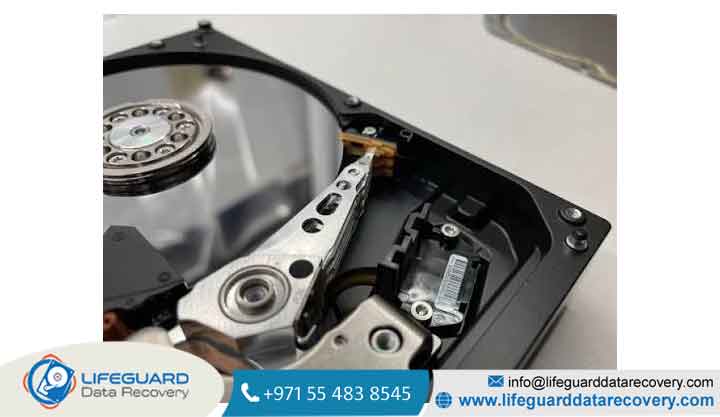
Inside a modern hard disk drive, data is stored on ultra-polished circular disks called platters. These platters are manufactured from rigid aluminum alloy or glass-ceramic substrates and coated with a microscopic magnetic thin-film layer measuring only a few nanometers thick.
During normal operation, platters rotate at high speeds (typically 5,400 to 7,200+ RPM) while the read/write heads glide directly above the platter surface on an air cushion created by the spinning disk. The distance between the head slider and the magnetic coating nown as the fly height is thousands of times thinner than a single human hair or a grain of dust.
Can Data Be Recovered from Damaged Platters?
-
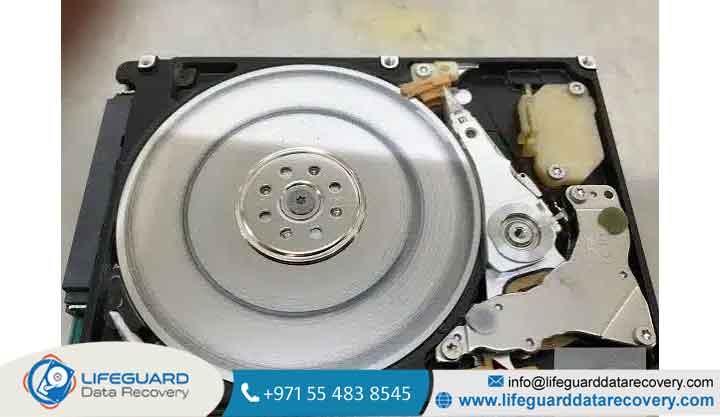
Light to Moderate Damage (Recoverable): If a read/write head contacts the platter briefly or creates minor localized surface imperfections, professional data recovery engineers can clean, burnish, and image the remaining healthy magnetic sectors.
Primary Causes of HDD Platter Damage
Platter degradation rarely happens spontaneously; it is usually driven by mechanical failures, physical shocks, or electrical issues.
Head Crash (Mechanical Drop or Impact)
When an external hard drive or laptop is dropped while running, the mechanical shock forces the floating read/write heads to slam into the spinning platters. This event, known as a head crash, gouges the delicate magnetic thin-film layer and destabilizes the head assembly.
Motor Bearing Failure & Spindle Misalignment
Hard drive spindles rely on fluid dynamic bearings to spin true. Over years of wear or following a severe drop, these bearings can seize or become misaligned. Spindle wobble causes platters to rotate unevenly, bringing them into direct contact with the read/write heads.
Thermal Stress & PCB Electrical Failures
Power surges or failing cooling fans cause intense heat build-up inside the drive housing. Thermal expansion can warp microscopic components, forcing delicate head sliders out of alignment and causing rotational surface contact.
Critical Signs & Symptoms of Platter Damage
Recognizing early warning signs allows you to disconnect the drive before surface scraping turns minor damage into total data loss.
Audible Warning Signs: Clicking, Beeping, or Grinding
-
Rhythmic Clicking: Known as the “Click of Death,” this indicates the read/write heads are attempting to calibrate but fail to read system tracks on the platter.
-
Metallic Grinding: A harsh, high-pitched scraping sound indicates the read/write head assembly is actively contact-scraping the spinning platter surface. Unplug power immediately if you hear this sound.
System & Hardware Symptoms
-
System Freezes During Boot: The host computer hangs or freezes when attempting to enumerate the attached hard drive.
-
Disk Utility Errors: Operating systems report “Disk Boot Failure,” “I/O Device Error,” or prompt you to format the drive upon connection.
-
S.M.A.R.T. Parameter Spikes: Disk monitoring utilities flag critical spikes in Reallocated Sectors Count, Current Pending Sector Count, or Uncorrectable Sector Count.
Why DIY Software Recovery Fails (And Will Permanently Destroy Your Data)
One of the most dangerous mistakes after a physical hard drive failure is running downloadable commercial data recovery software.
Critical Warning: Data recovery software utilities (such as Recuva, EaseUS, or Stellar) are designed exclusively for logical data loss
When you run scanning software on a drive with physical platter damage:
-
The software forces the damaged read/write heads to continuously attempt reading unreadable sectors across the entire platter surface.
-
The extra friction causes the failing heads to heat up and scrape across the disk surface, pulverizing the magnetic coating.
-
What started as a recoverable minor surface flaw becomes a scored, powder-covered platter with zero remaining retrievable data.
The Cleanroom Requirement (Class 100 / ISO 5)
Opening a hard drive outside of a certified environment introduces dust, smoke particles, and fingerprints to the platters. A single particle of dust is significantly larger than the flight height of a modern drive head; powering on an opened drive in an unsealed room causes the head to crash into the dust particle and plow directly into the magnetic surface.
How Professional Engineers Recover Data from Damaged Platters
Restoring data from physically compromised platters requires cleanroom facilities, specialized mechanical tools, and hardware-level disk imaging platforms.
ISO 5 Cleanroom Inspection & Decontamination
Technicians open the drive inside an audited Class 100 (ISO 5) Cleanroom. Under high-magnification optical equipment, engineers examine the platters to determine the geography and depth of surface damage.
Platter Burnishing & Debris Removal
If light magnetic dust or micro-debris covers the disk, the platters are carefully unmounted and processed using specialized burnishing machinery. This process removes loose microscopic particles and smooths out minor imperfections without destroying the underlying magnetic sectors.
Sector-by-Sector Hardware Imaging
This controller allows engineers to:
-
Disable damaged or unstable read heads.
-
Control read timeout thresholds to prevent thermal stress.
-
Image accessible raw binary sectors onto a healthy storage drive before the donor heads wear out.
Best Practices to Prevent Platter Damage & Data Loss
While physical hardware failure is sometimes unavoidable, taking preventive steps minimizes the risk of catastrophic data loss:
-
Adopt the Power-Down Protocol Immediately: At the first sound of unusual clicking, grinding, or system freezing, cut power to the drive. Do not attempt rebooting or running disk diagnostic scans.
-
Follow the 3-2-1 Backup Rule: Keep 3 copies of your important data, across 2 different storage media types (e.g., local external drive and internal NVMe SSD), with 1 copy stored securely offsite or in cloud storage.
-
Handle External Drives with Care: Never move, bump, or unplug an external hard drive while its activity LED indicates active reading or writing.
-
Monitor Disk Health Regularly: Use S.M.A.R.T. health monitoring utilities (like CrystalDiskInfo) to spot early signs of uncorrectable sector growth before severe mechanical failure occurs.
Frequently Asked Questions (FAQs)
How much does professional hard drive platter recovery cost?
Professional cleanroom recovery for physically damaged platters generally ranges from several hundred to a few thousand dollars depending on damage severity, lab hours required, and donor part costs. Reliable recovery labs operate on a “no data, no fee” policy.
Can I swap platters myself at home using a donor drive?
No. DIY platter swaps have a near 100% failure rate. Without precision platter stack alignment tools, an ISO 5 cleanroom, matching donor head stacks, and micro-code adjustments, opening and swapping platters at home guarantees total data destruction.