Solid-State Drives (SSDs) have transformed modern computing by replacing fragile, mechanical hard drives with lightning-fast flash storage. However, unlike traditional magnetic platters that often warn you with clicking sounds or bad sector prompts, SSDs rely entirely on silicon microchips. When the underlying flash memory begins to fail, the breakdown can feel sudden, silent, and catastrophic.
If your system is freezing, dropping files, or refusing to boot, you may be experiencing SSD NAND memory failure. This guide breaks down what happens inside an SSD at the microscopic level when NAND memory fails, the warning signs to watch for, why popular DIY fixes can permanently ruin your data, and what real data recovery options look like.
Understanding SSD NAND Flash Memory and Wear Mechanisms
To understand SSD NAND memory failure, you must first understand how flash storage retains information. SSDs store data using arrays of floating-gate or charge-trap transistors. These tiny structures trap or release electrical charges to represent binary bits .
How NAND Cells Store Data (and How They Degrade)
Writing data requires pushing high-voltage electrical current through an oxide insulation barrier into a memory cell’s charge trap. Erasing data forces those electrons back out. Every write/erase operation known as a Program/Erase (P/E) cycle causes physical damage to this oxide layer.
Over time, the microscopic insulation breaks down:
-
Cell Wear: Trapped electrons leak out, causing stored data values to shift over time.
-
TLC and QLC Vulnerability: Triple-Level (TLC) and Quad-Level (QLC) NAND store 3 to 4 bits per cell. Because they require precise voltage states, subtle physical wear triggers bit errors much faster than older single-level cell (SLC) drives.
The Difference Between Controller Failure and Failed NAND Chips
An SSD consists of two main components: the controller (the drive’s CPU) and the failed NAND chips in SSD assemblies (the storage vault).
-
Controller Failure: The drive’s processor or power circuitry dies due to heat or electrical surges. The NAND cells holding your files remain intact, but the gate to reach them is locked.
-
NAND Chip Failure: The physical silicon storage cells decay. When critical cells die, the controller loses the ability to read or write persistent data.
What Happens When SSD NAND Memory Fails? (Core Failure Stages)
When SSD NAND memory fails, the drive undergoes a multi-stage degradation process rather than failing instantly.
Bad Block Management and Dynamic Remapping
During early degradation, individual NAND cells wear out. The controller silently intervenes by taking bad blocks offline and mapping file requests to a reserved set of “over-provisioned” spare blocks. The drive functions normally during this stage, and the operating system is unaware that physical wear is accumulating.
Bit Rot and Uncorrectable ECC Errors
As reserve blocks run out, the controller relies on Error Correction Code (ECC) algorithms to fix corrupted bits on the fly. Eventually, physical charge leakage outpaces what the ECC engine can handle, leading to SSD corrupted due to NAND failure symptoms such as individual files becoming unreadable, photos rendering half-gray, or applications failing to open.
Flash Translation Layer (FTL) Corruption
The Flash Translation Layer (FTL) is an internal directory that maps logical sector addresses (what Windows or macOS sees) to physical NAND block locations. The FTL updates constantly inside the NAND. If the NAND blocks holding the FTL degrade or suffer a sudden power interruption mid-write, the index vanishes.
Without an FTL, the controller cannot locate any stored files. The drive may suddenly show up as RAW, display 0 MB capacity, or present generic manufacturer safe-mode names like SATAFIRM S11.
Firmware Panic Lockout (Read-Only or Total Dead State)
To protect data integrity, SSD firmware triggers a safety state when it detects critical block depletion:
-
Read-Only Lockout: The controller blocks all incoming write commands. You can view or copy existing files, but you cannot save new ones.
-
Panic State: If critical boot-area NAND modules are corrupted, the controller refuses to boot entirely, rendering the SSD not detected due to NAND failure.
Key NAND Flash Failure Symptoms to Watch For
Catching SSD NAND failure symptoms early provides the best chance to rescue your data before the controller locks down.
| Symptom | Hardware Reality | Urgency Level |
| Severe Write Slowdowns | Controller is failing write retries and searching for reserve blocks. | Warning (Back up immediately) |
| Files Becoming Read-Only | ||
| System Freezes During Large Transfers | Uncorrectable ECC errors triggering controller reset loops. | Critical (Stop write tasks) |
| Drive Recognized as Generic Device (0 MB) | FTL corruption or service area block death. | Emergency (Requires lab recovery) |
Dramatic Write Speed Drops and System Freezes
When write operations hit degraded cells, the controller retries the write, erases alternative blocks, and updates the translation map. This creates write amplification latency, dropping transfer speeds from 3,000 MB/s to single-digit kilobytes and causing system lockups.
Files Randomly Becoming Read-Only or Corrupted
If an OS file system attempts to access a degraded sector that fails ECC checks, the operation aborts. Operating systems like Windows or macOS often flag the drive as “Write-Protected” or restrict access to read-only mode to prevent file corruption.
SSD Not Detected in BIOS/OS or Displaying Incorrect Capacity
When critical SSD memory chip failure affects system service areas (where internal microcode is held), the controller enters recovery mode. Disk Management will report “Uninitialized,” “No Media,” or an incorrect capacity (e.g., 20 MB or 0 B).
S.M.A.R.T. Attribute Alerts (and Why They Can Sometimes Lie)
S.M.A.R.T. utility tools report on metrics like Percentage Lifetime Used, Reallocated Sectors, and Uncorrectable Error Count. However, S.M.A.R.T. metrics read from cached metadata. If a controller suffers a sudden panic lock or a critical power line fails, an SSD can drop dead while reporting “100% Health” minutes prior.
What NOT to Do When Facing SSD NAND Failures
When encountering NAND flash failure symptoms, standard hard drive troubleshooting methods can cause permanent data loss.
Why You Should Avoid Running CHKDSK, Format, or Defrag
-
CHKDSK/ Disk Scans: Drive repair software attempts to repair broken file indices by reading, writing, and reallocating sectors. On dying NAND, this subjects fragile cells to thousands of stress cycles, accelerating total drive failure. -
Formatting: Formatting sends TRIM commands from the OS to the SSD controller. TRIM marks all blocks in the partition as permanently erased, clearing data out of memory cells during internal garbage collection.
-
Defragmentation: SSDs do not use mechanical heads; defragmenting an SSD provides zero speed benefits while burning through valuable write cycles.
The Danger of Repeated Power Cycles
When an SSD boots up, the controller loads its internal operating system from the NAND service area into high-speed DRAM. Powering a corrupted drive on and off repeatedly forces the controller to execute stress-heavy initialization routines. This can permanently burn out failing blocks holding critical FTL mapping tables.
SSD Data Recovery Options After NAND Degradation
When physical wear leads to hardware failure, standard data recovery software usually cannot access the drive. Recovery paths depend on whether the drive is logically accessible.
Software-Based Imaging (For Drives Still Detected in Read-Only Mode)
If your SSD is still detected by the motherboard, avoid browsing files normally. Operating systems write temporary logs constantly, which can cause a failing controller to lock.
Instead, perform a sector-by-sector clone using specialized disk-imaging tools (such as or hardware pass-through utilities) to mirror the raw data onto a healthy drive before the controller crashes.
Professional Hardware & Chip-Off Recovery (For Dead Drives)
If the drive is unreadable, displaying 0 MB, or suffering from a hardware lock, professional NAND flash data recovery is required.
-
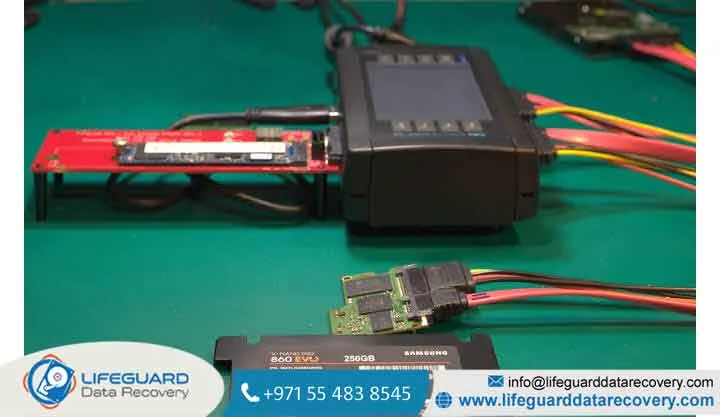
Service Area Repair (PC-3000): Technicians put the controller into factory Safe/Tech Mode, patch corrupt firmware modules in RAM, and bypass hardware write-blocks.
-
Chip-Off Recovery: If the controller is dead or encrypted metadata is unreadable, specialists desolder the individual NAND memory packages from the PCB.
-
Raw Extraction & Assembly: The raw hex dump is read off each chip using custom socket adapters. Engineers must manually reverse-engineer the original controller’s data-striping patterns, XOR descrambling algorithms, and ECC parity layers to reconstruct the file system.
How to Prevent Premature SSD NAND Failure
While all flash memory eventually wears out, adopting good drive-management practices will maximize your SSD’s lifespan.
Managing Drive Capacity and Over-Provisioning
Always leave 15% to 20% of your SSD unallocated or free. When an SSD operates near maximum capacity, the controller lacks free blocks for wear leveling and garbage collection. This causes high write amplification, wearing out the remaining memory cells much faster.
Temperature Control and Power Protection
Excessive heat accelerates charge leakage across insulating oxide layers. Ensure NVMe M.2 drives are fitted with adequate heatsinks. Additionally, connect your desktop or NAS system to an Uninterruptible Power Supply (UPS); sudden power cuts mid-write are the leading cause of FTL metadata corruption.
Addressing Cold Storage Charge Leakage
NAND flash memory is not designed for long-term unpowered archiving. Unpowered cells lose electrical charge over time due to natural quantum tunneling. An SSD left in a drawer at room temperature can begin suffering bit rot within 1 to 3 years. Connect archived SSDs to power at least once a year to allow the controller to refresh stored voltages.
Frequently Asked Questions (FAQs)
Can a failed NAND flash chip on an SSD be replaced?
Replacing an individual NAND chip is technically possible using BGA rework tools, but it will not restore your operating system or files. Because data is striped dynamically across every NAND package on the board, replacing a single dead chip creates an incomplete array, corrupting the volume. Drive replacement is much safer and more cost-effective.
Does an SSD NAND failure wipe all data permanently?
Not always. In many cases, the stored data remains physically trapped inside the charge traps. Loss of access is usually caused by broken Flash Translation Layer index maps or controller lockout mechanisms. Professional recovery labs can often extract this trapped data.
How long does NAND flash keep data without power?
It depends on temperature and wear state. A brand-new drive stored at room temperature ($25^\circ\text{C}$ / $77^\circ\text{F}$) can retain data for several years. However, a worn-out SSD near the end of its rated P/E lifespan stored in a warm environment ($35^\circ\text{C}+$ / $95^\circ\text{F}+$) can lose data integrity in as little as a few months.
Why does my SSD say 100% health in S.M.A.R.T. if it failed?
S.M.A.R.T. reports physical endurance metrics like consumed write cycles, but it cannot predict sudden controller failures, electrical shorts, or unexpected power-loss corruptions in the