How Can I Recover Deleted Files From My Laptop The Ultimate Guide to Professional Recovery in the UAE Losing access to your digital world is a high-stress event that often occurs at the most inconvenient moment.
Whether it is an accidental deletion of a presentation in a Business Bay boardroom or a sudden hard drive failure in a home office in JLT, the question “How can I recover deleted files from my laptop is one we hear daily at Lifeguard Data Recovery.
In the United Arab Emirates, where business moves at a rapid pace, the loss of critical files is more than just an inconvenience it can be a threat to your professional reputation and financial stability. Lifeguard Data Recovery provides the technical bridge between digital disaster and total restoration, offering the most trusted and technically advanced laptop data recovery UAE has to offer.
Understanding the Stakes of Laptop Data Loss
When you find yourself searching for how can I recover deleted files from my laptop, the first hurdle to overcome is the emotional response. The sudden disappearance of a year’s worth of financial records or a decade of family photos triggers an immediate sense of panic.
In the corporate hubs of the UAE, this is compounded by the pressure of deadlines and the high cost of downtime. However, it is essential to understand that the architecture of a laptop is designed with layers of redundancy.
When a file is “deleted,” the operating system often simply removes the pointer to that data, leaving the actual binary information on the drive until it is overwritten by new activity.
This “window of opportunity” is what our engineers at Lifeguard Data Recovery specialize in. However, the move toward Solid State Drives (SSDs) in modern ultra books and Mac Books has made this window smaller. Technologies like the TRIM command are designed to clean up deleted data blocks almost instantly to keep the drive fast.
This is why immediate intervention is required. Whether you need to recover permanently deleted files Windows 11 or need specialized Macbook data recovery Dubai, every minute the device stays powered on decreases the probability of a perfect recovery. Our role is to provide the professional intervention necessary to stop automated wipe processes and salvage your data before the system overwrites it forever.
Why Choose Lifeguard Data Recovery for Your Laptop?
Choosing a data recovery provider in the UAE requires a balance of technical trust and geographical convenience. Lifeguard Data Recovery is a locally established leader with a physical presence in the heart of Dubai. We do not ship your sensitive business hardware to other countries; all work is performed in our secure, monitored laboratory.
This ensures that your data is protected under UAE privacy laws and that the turnaround time is as fast as possible. We serve a diverse clientele, from government entities and law firms to creative freelancers and students, providing each with the same level of rigorous technical scrutiny.
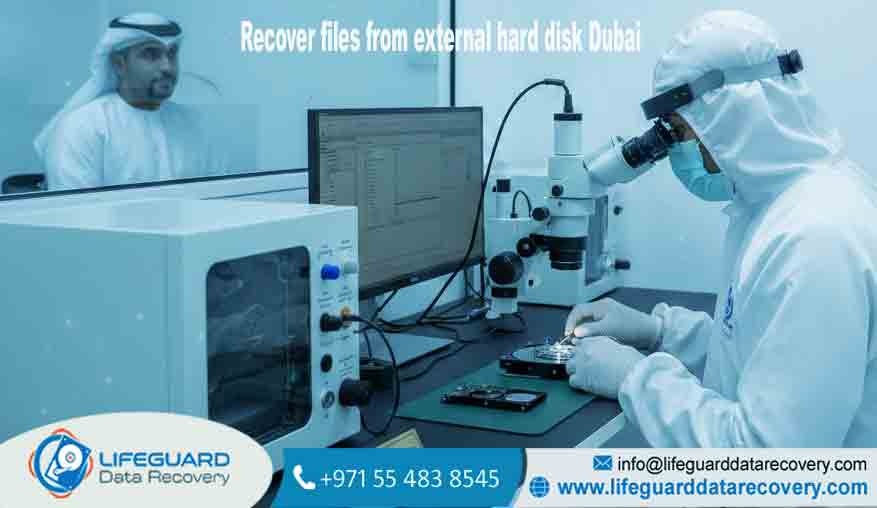
Our laboratory is one of the few in the region equipped with an ISO Class 100 Cleanroom. This is a vital distinction. Many local repair shops will attempt to open a hard drive in a standard office environment, which leads to immediate and permanent data loss due to microscopic dust particles.
At Lifeguard, we follow international forensic standards. Our engineers use proprietary hardware-software suites that can communicate with a drive even when its internal firmware is corrupted or its controller has failed. When you choose us, you are choosing a partner dedicated exclusively to data recovery not a general computer repair shop.
Our Specialized Data Recovery Services
Hard Drive and SSD Data Recovery Dubai
Laptops today utilize two primary storage technologies, each requiring a different recovery strategy. Traditional Hard Disk Drives (HDDs) are prone to mechanical failure, often signaled by clicking or grinding noises.
Our hard drive recovery Dubai service involves micro-mechanical surgery to replace failed components. Conversely, SSDs are purely electronic. Our SSD Data Recovery Dubai team uses chip-off techniques and controller emulation to retrieve data from drives that have suffered electronic surges or firmware “bricks.”
Professional Macbook Data Recovery Dubai
Apple’s integration of storage directly into the logic board and the use of the T2 and M-series security chips has made Mac recovery a specialized field. We provide expert Macbook data recovery Dubai, handling everything from liquid-damaged motherboards to corrupted APFS containers.
We have the micro-soldering expertise required to stabilize a dead MacBook board just long enough to extract the data via the internal life-boat connectors or direct NAND access.
Recovering Files After Formatting Laptop
Accidentally formatting a drive is a common human error. Whether you were trying to reinstall Windows or reset your laptop for a new user, we can often perform a deep forensic scan to find the remnants of the old file system.
We excel at helping users who need to recover files after formatting laptop storage, even when a new operating system has been partially installed.
Mobile and External Media Recovery
Laptops often act as the hub for other devices. We also provide recovery for the peripheral devices used by laptop owners, including USB flash drives, SD cards from cameras, and external backup drives. If your external drive has suffered a drop or is no longer appearing on your desktop, our engineers can perform the necessary repairs to bring your files back.
The Lifeguard Recovery Process: A Step-by-Step Guide
-
Initial Consultation and Free Diagnosis: We begin with a free assessment of your laptop or drive. You can visit our data recovery services in Business Bay or use our secure courier service. We identify the failure type and provide a fixed-price quote based on the complexity of the engineering required.
-
Forensic Imaging: To protect the integrity of your data, we never work directly on your original device after the initial diagnosis. We use specialized equipment to create a bit-level forensic clone of the storage media. This ensures that even if the original drive fails further during the process, your data is already safely captured in an image.
-
Laboratory Engineering: Our engineers work on the forensic image to reconstruct the file system. In cases of laptop hard drive clicking recovery, this involves working in the cleanroom to replace the head stack assembly. For logical cases, it involves using complex algorithms to rebuild corrupted file headers.
-
Data Verification: Once the recovery is complete, we provide you with a full file tree. You can remotely or physically verify that your most important folders such as those needed to recover deleted business documents Dubai are present and functional.
-
Secure Data Handover: Your recovered files are encrypted and moved to a new, healthy storage device of your choice. We then safely return your original hardware and the new drive containing your restored digital life.
Issues We Fix Overcoming Data Disasters
Laptop data loss is usually the result of one of the following “pain points,” all of which we resolve daily:
-
Accidental Deletion & Formatting: We use deep-parsing tools to find files that have been “permanently” deleted from the trash or lost during a drive format.
-
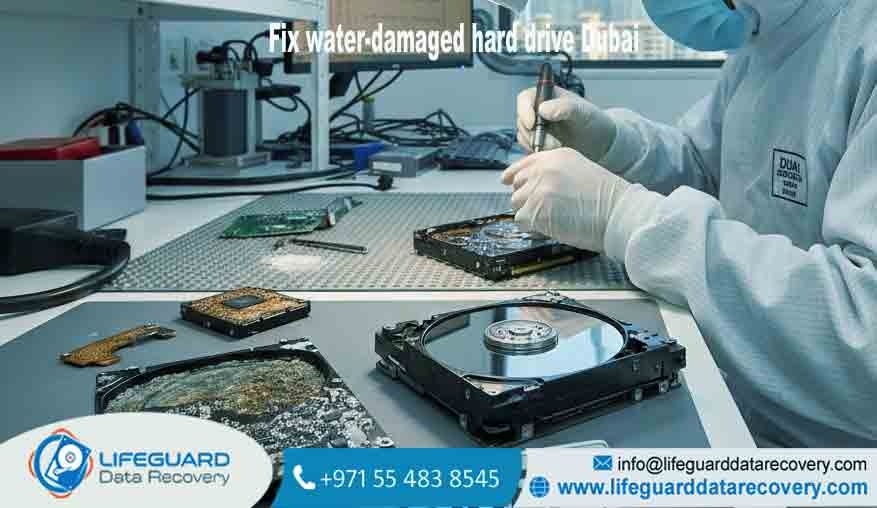
Liquid Damage & Spills: Dubai’s coffee shop culture often leads to laptop liquid damage. We use ultrasonic cleaning and board-level repair to access data on laptops that will no longer power on.
-
Mechanical & Physical Damage: If your laptop has been dropped or is making unusual sounds, we perform the delicate internal repairs needed to salvage the data.
-
Firmware & Controller Corruption: Sometimes the “brain” of the drive fails, making it invisible to the computer. We use specialized hardware to reload the firmware and gain access to the data area.
-
Ransomware & Malware Attacks: We assist businesses in recovering data that has been maliciously encrypted or deleted by cyber-attacks.
-
Operating System Failures: When your laptop is stuck in a boot loop or shows a “No Bootable Device” error, we extract the data directly from the underlying storage.
Transparency in Service Costs
At Lifeguard Data Recovery, we believe that professional engineering should come with clear expectations. While we do not provide flat-rate pricing because every data loss case is unique, we ensure complete transparency throughout our process. The complexity of the recovery whether it is a simple software-level retrieval or a complex cleanroom surgery is what determines the resources required.
Factors that influence the engineering effort include the type of storage (SSD vs. HDD), the capacity of the drive, the presence of hardware encryption, and the physical state of the media. We provide a fixed, no-obligation quote after our free diagnostic phase.
If you choose not to proceed, there is no charge. Furthermore, our No Data – No Fee policy is your ultimate safeguard; if we cannot recover the files you have identified as critical, you do not pay for the recovery service. This ensures our laboratory is purely focused on achieving a successful outcome for you.
Tips and Advice Protecting Your Data
When the question “How can I recover deleted files from my laptop?” arises, the best outcome is avoided through preparation. However, if you are currently in a loss situation, follow these rules:
-
Power Down Immediately: If you suspect a failure or realize you have deleted something important, turn off the laptop. Modern operating systems constantly write data to the drive, which can overwrite your deleted files.
-
Do Not Use Recovery “Apps” on the Same Drive: Never download or install recovery software onto the drive from which you are trying to recover data. The installation process itself could destroy your files.
-
Avoid “Fridge” or “Hit” Myths: Do not follow online advice about putting hard drives in the freezer or tapping them to stop clicking. These actions cause irreversible physical damage.
-
Verify Your Cloud Sync: Sometimes, files deleted locally may still exist in the “Deleted Items” folder of your OneDrive, iCloud, or Dropbox web interface. Check these first.
-
Implement the 3-2-1 Backup Rule: Once your data is recovered, ensure you have three copies of your data, on two different types of media, with at least one copy stored off-site (in the cloud or a different physical location).
Why Lifeguard is the Premier Choice in the UAE
Lifeguard Data Recovery is positioned as the most reliable provider in the region because we treat every laptop as if it contains the world’s most important information. Our unique value lies in our combination of forensic expertise and high-end hardware. We are not just recovering files; we are providing peace of mind.
Our cleanroom capabilities, same-day emergency options, and strict adherence to data privacy make us the preferred partner for Dubai’s corporate and legal sectors. When you trust us with your laptop, you are trusting a team that has successfully navigated thousands of the most complex data loss scenarios imaginable.
Success Stories Laptop Recovery in Action
Case Study 1: The Ph.D. Thesis Recovery
A student in Dubai International Academic City suffered a hard drive failure just one week before her thesis submission. The drive was making a clicking sound and was not recognized by any computer.
-
The Challenge: Mechanical head failure on a high-capacity HDD.
-
The Result: Our cleanroom team performed a head stack replacement. We achieved a 100% recovery of the thesis and research data within 72 hours.
Case Study 2: The Deleted Financial Audit
A financial auditor in Business Bay accidentally deleted a folder of encrypted spreadsheets during a routine laptop cleanup.
-
The Challenge: The laptop used a modern NVMe SSD with TRIM active, making deleted file recovery highly technical.
-
The Result: Using forensic imaging to catch the data before the TRIM command could finalize, our engineers recovered all 400+ critical documents.
Frequently Asked Questions (FAQs)
1. Is it possible to recover files after the Recycle Bin is emptied?
Yes. In Windows and macOS, emptying the bin doesn’t immediately erase the data. It tells the computer that the space is now “free” for new data. If you stop using the device, we can usually retrieve those files.
2. Can you recover data from a dead MacBook?
Yes. Even if the laptop has no power, we can extract data from the storage. On newer MacBooks where the storage is soldered, we use board-level repair to access the data.
3. How long does the average laptop recovery take?
Most standard cases are completed within 3 to 5 business days. Our Emergency data recovery Dubai 24/7 service is available for cases that need to be resolved in 24 hours or less.
4. Will my data stay confidential?
Absolutely. We are an ISO-compliant lab. We provide NDAs and ensure that your data is never viewed by anyone other than the engineer assigned to the recovery, and only for verification purposes.
5. What should I do if my laptop makes a clicking noise?
Turn it off immediately. A clicking noise means the mechanical parts are failing and could be scratching the data platters. Professional cleanroom intervention is required.
6. Can you recover data from a formatted SSD?
Yes, though it is more complex than HDD recovery. We use specialized tools to reconstruct the data maps that were lost during the format.
7. Does your “No Data – No Fee” policy apply to all cases?
Yes. If we cannot recover the files you need, you do not pay the recovery fee. This is our guarantee of professional service.
8. Do you serve areas outside of Dubai?
Yes, we provide full UAE-wide coverage. Whether you are in Abu Dhabi, Sharjah, or Fujairah, we can arrange secure transport for your device.
9. Can I try a free recovery program first?
We do not recommend this for important data. Free programs are often limited and can cause further damage to a drive that is already failing.
10. What information do I need to provide for a diagnosis?
Knowing the laptop model, the symptoms (e.g., did it fall, or was it a deletion?), and what specific files are your priority helps our engineers work faster.
Contact Lifeguard Data Recovery Today
The moment you realize your data is gone, the clock starts ticking. Contact Lifeguard Data Recovery to speak with a specialist who can guide you through the next steps. We are the trusted experts for Professional Data Recovery Dubai, and we are ready to help you reclaim your digital life.