Restore Files After Malware Attack Dubai Professional Malware Data Recovery and Cyber Restoration in the UAE When a digital ecosystem falls victim to a cyber assault, the fallout is rarely limited to a single device.
At Lifeguard Data Recovery, we recognize that a malware infection is a high-stakes emergency that threatens the very foundation of your business operations and personal security. As the most reliable, technically advanced, and trusted data recovery service provider in the UAE, we specialize in rescuing data from the most aggressive digital threats.
Our team of certified engineers is dedicated to helping you utilizing military-grade forensic tools to ensure your data is returned safely and securely.
The Critical Nature of Professional Malware Data Recovery
In the wake of a cyberattack, the first instinct for many is to attempt a DIY fix. However, malware is designed to be resilient. Sophisticated strains of ransomware and trojans often embed themselves deep within the file system architecture.
Attempting to fix corrupted files after malware infection using standard antivirus software or unverified online “decrypters” can lead to a catastrophic outcome: permanent data overwriting. When a virus deletes or encrypts a file, the data often still exists in the “raw” sectors of the drive. Every time an amateur tool is run on that drive, it risks writing new data over those precious fragments.
Lifeguard Data Recovery approaches malware restoration as a forensic science. We understand the unique digital landscape of the UAE, where businesses in Dubai Internet City and DIFC are often targeted by localized phishing and global ransomware campaigns. Our professional malware data restoration Dubai services prioritize the preservation of the original media.
We create bit-for-bit clones of compromised drives, ensuring that the recovery process itself never puts the original data at further risk. By trusting a specialized data recovery company UAE residents have relied on for decades, you are choosing a path that prioritizes the integrity of your information above all else.
Why Choose Us
Lifeguard Data Recovery is not merely a repair shop; we are a specialized data laboratory that represents the pinnacle of digital restoration technology in the Middle East.
Hard Drive and SSD Data Recovery
Malware often targets the partition tables and file system headers of HDDs and SSDs. We specialize in malware removal and HDD restoration Dubai, rebuilding the logical structure of the drive to make the data readable again.
Video and Media File Recovery
The creative industry in Dubai is a major target for malware. If a Trojan has corrupted your 4K or 8K project files, we offer specialized services to recover files deleted by virus Dubai. We don’t just find the files; we repair the internal headers of MP4, MOV, and high-end RAW video containers, ensuring the footage is playable and ready for the edit suite.
RAID, Server, and NAS Recovery
A ransomware attack on a company server in Business Bay can stop an entire organization. We provide high-priority RAID and server recovery, reconstructing striped data sets across multiple disks even when the file system has been completely encrypted. Our ability to decrypt ransomware files without key UAE protocols involves identifying weaknesses in the malware’s implementation or utilizing backup shadow copies that the virus failed to delete.
Process: How It Works
We follow a rigorous, forensic-standard workflow to ensure that every recovery attempt is safe, documented, and successful.
Phase 1: Consultation and Emergency Shutdown
The process begins with an immediate consultation. We advise all malware victims to power down their systems immediately to stop the spread of encryption. We then arrange for secure transport of the media to our Dubai laboratory.
Phase 2: Isolated Forensic Diagnosis
Once in our lab, the device is placed in a “sandbox” environment. This isolated network prevents the malware from communicating with external servers or spreading to our internal systems. We analyze the specific strain of the virus and determine the level of entropy in the encrypted files.
Phase 3: Forensic Cloning and Analysis
We never work on the original drive. We create a bit-level clone using hardware write-blockers. This ensures the original media remains in the exact state it was in when it arrived. Our engineers then analyze the clone to identify recoverable file signatures.
Phase 4: Data Reconstruction and Decryption
Using our proprietary software suite, we begin the process of rebuilding the corrupted data. This may involve repairing partition tables, fixing corrupted file headers, or running brute-force decryption against known ransomware vulnerabilities. Every file is checked for integrity.
Issues We Fix: Expanded Technical Context
Modern malware does more than just “delete” files; it fundamentally alters how a computer views its own storage.
Accidental Formatting and Deletion
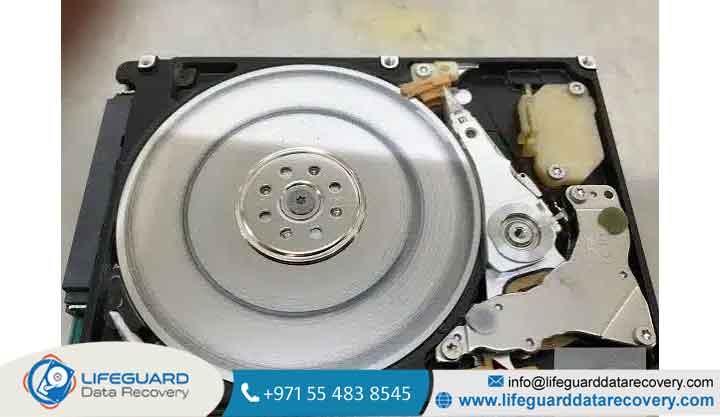
In the heat of a malware attack, many users try to “reset” their PC or format the drive to kill the virus. While this removes the malware, it also deletes the “map” to your files. We can recover files deleted by virus Dubai even after a “Quick Format” or a “System Restore,” as the raw data blocks are often still intact on the platters.
Corruption of Professional Media
Media professionals on Sheikh Zayed Road often face “header corruption,” where a virus targets the first few kilobytes of every file. This makes the file unreadable to any software. We fix corrupted files after malware infection by using file-carving techniques that ignore the corrupted headers and rebuild the file based on its internal data patterns.
Operating System and Partition Failure
Malware often targets the Master Boot Record (MBR) or the EFI partition. This results in the “No Bootable Device Found” error. Our system recovery after cyber attack UAE services bypass the OS entirely, allowing us to read the data directly from the disk partitions without needing the infected operating system to boot.
Ransomware and Targeted Attacks
Ransomware is the most severe issue we fix. Whether it is a “WannaCry” variant or a modern “LockBit” infection, we specialize in identifying the encryption method. We offer dedicated IT security and data recovery Business Bay services to help businesses navigate these complex attacks without succumbing to the demands of cybercriminals.
The Emotional and Financial Impact of Malware
Data loss is not just a technical problem; it is a deeply human one. For a business, it means missed deadlines, potential legal liabilities, and a loss of client trust. For an individual, it can mean the loss of a lifetime of memories.
We have seen firsthand the distress that a “Trojan horse” or a ransomware note causes. This is why Lifeguard Data Recovery emphasizes empathy and clear communication. We don’t just fix drives; we restore peace of mind. By providing a clear, professional path to recovery, we take the burden off your shoulders and allow you to focus on rebuilding your security.
Case Studies: Real Success in the UAE
Case Study 1: The DIFC Law Firm Restoration
Our engineers worked through the night to bypass the corrupted partition table and extract the files from a secondary shadow volume that the malware had partially missed. Within 36 hours, the firm was back online with 98% of their data restored.
Case Study 2: The Al Barsha Media Studio Recovery
A media production house in Al Barsha found that a Trojan had corrupted their entire archive of raw footage for a high-profile client. We provided Trojan horse file recovery services, manually repairing the headers of over 400 corrupted video files. The studio was able to deliver their project on time, avoiding massive contractual penalties.
Case Study 3: Small Business Recovery in Sharjah
A small retail business in Sharjah had their POS database deleted by a malicious script. We performed malware removal and HDD restoration Dubai, using deep-sector scanning to find the deleted database fragments and rebuild the SQL table. The business was able to restore their inventory and sales records without losing a single day of transaction history.
Frequently Asked Questions
2. How long does the recovery take?
Standard diagnosis takes 24 hours. A full recovery typically takes between 2 and 5 business days, depending on the severity of the encryption or corruption.
3. Is it possible to decrypt ransomware without the key?
In some cases, yes. We use forensic techniques to find the key in the system’s memory or exploit known weaknesses in the ransomware’s programming.
4. Will my files be the same as before?
Our goal is 100% integrity. We verify the files during the extraction process to ensure they open and function exactly as they did before the attack.
5. How do I know what data is recoverable before I pay?
We provide a comprehensive file list for your review. You only pay for the recovery once you have confirmed that the critical data is present.
6. Can you recover data from a laptop that won’t turn on?
Yes. We remove the drive from the laptop and use our specialized lab equipment to read the data directly.
7. Do you provide services in Abu Dhabi?
Yes, we provide data rescue services UAE-wide, including Abu Dhabi, Sharjah, and all other emirates.
8. Is my data kept confidential?
We adhere to the strictest privacy standards. Our lab is secure, and your data is never uploaded to the cloud or shared with third parties.
9. What should I do if I see a ransom note?
Do not interact with it. Turn off the computer and call a professional data recovery service immediately.
10. Why is professional recovery better than using home software?
Professional tools operate at the hardware level and use write-blockers to protect the drive. Home software can stress a failing drive and cause permanent data loss.
Contact Lifeguard Data Recovery
If you are facing a data loss crisis due to a malware attack, do not wait. Every moment the device is powered on increases the risk of permanent loss. Lifeguard Data Recovery is ready to provide the expert help you need.