
How Does Mechanical Hard Drive Recovery Work
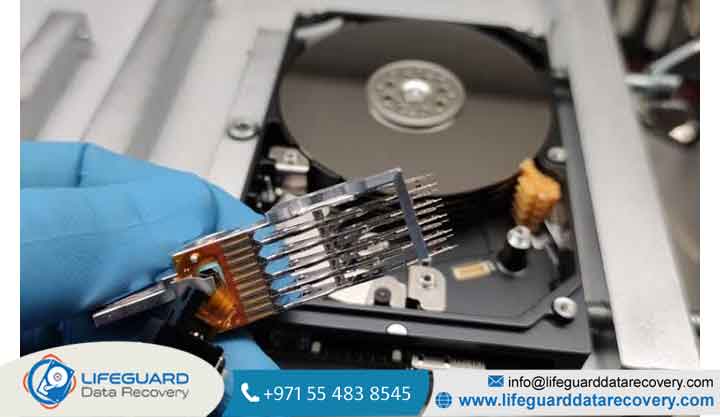
When a mechanical hard drive (HDD) stops working, the failure is often far more complex than simple file corruption. Unlike solid-state drives (SSDs) or cloud storage systems, traditional hard drives rely on high-precision mechanical assemblies operating at sub-microscopic tolerances.
When those mechanical components degrade or break, restoring access to your files requires a specialized combination of physics, cleanroom engineering, and low-level firmware manipulation.
Understanding how does mechanical hard drive recovery work requires stepping inside an advanced data recovery laboratory to see how specialists repair physical hardware, bypass damaged microcode, and extract raw binary data from damaged magnetic platters.
Overview: Mechanical HDD Anatomy & Physical Failure Modes
To understand mechanical HDD recovery, you must first understand the mechanical architecture inside the drive enclosure.
A standard 3.5-inch or 2.5-inch hard drive contains several core mechanical parts:
-
Magnetic Platters: High-precision glass or aluminum disks coated with a thin ferromagnetic layer that stores binary data (1s and 0s).
-
Spindle Motor: Rotates platters at constant speeds ranging from 5,400 RPM to 15,000 RPM.
-
Read/Write Slider Heads: Microscopic sensors mounted on an actuator arm that read and write magnetic orientation on the platter surface.
-
Printed Circuit Board (PCB): The external electronics board that processes controller commands, manages power distribution, and holds unique adaptive firmware.
Logical vs. Physical Failure
A logical failure occurs when the mechanical drive operates perfectly, but file structures, partition tables, or operating systems become corrupted.
In contrast, hard drive mechanical failure recovery deals with physical hardware breakdown. Read/write slider heads float above spinning platters on an aerodynamic air cushion measuring less than 10 nanometers roughly 1/1,000th the width of a single human hair. If physical shock, age, or manufacturing defects cause those heads to touch the platter surface, physical destruction begins immediately.
Causes & Symptoms: Diagnosing Mechanical Breakdown
Physical hard drive failure usually presents clear warning signs. Recognizing these early prevents total data loss.
Primary Causes of Hardware Failure
-
Physical Drops & Impacts: Even a minor bump while the drive is spinning can force the slider heads into direct contact with the platters.
-
Spindle Motor Bearing Seizure: Overheating or fluid dynamic bearing failure can lock the spindle motor, preventing platters from spinning up.
-
Electrical Power Surges: Power anomalies can blow protective diodes on the PCB, short-circuiting the drive motor controller.
-
Normal Wear & Tear: Over time, slider head read elements degrade due to thermal cycle stress, eventually failing to recognize track alignment markers (servo data).
Warning Signs of Mechanical Failure
-
The “Clicking” Sound: A repeated, rhythmic click indicates that read heads cannot read the drive’s system area or servo track references. The head arm repeatedly sweeps to its physical stop and returns.
-
Grinding or Scrape Sounds: Indicates direct physical contact between the read head slider and the magnetic platter coating.
-
High-Pitched Buzzing or Silence: Occurs when the spindle motor is seized or unable to overcome bearing friction.
Critical Warning: Never run DIY software recovery programs on a physically clicking or grinding drive. Software tools force damaged read/write heads to repeatedly sweep across fragile platters, generating microscopic debris that permanently gouges away data-bearing magnetic material (known as a “ring of death”).
Step-by-Step Solutions: The Physical Hard Drive Recovery Process
Executing mechanical hard drive data recovery requires a strict five-step engineering workflow carried out by hard drive recovery specialists.
Diagnostic Evaluation in an ISO 5 (Class 100) Cleanroom
A single dust particle measures around 30 to 50 microns thousands of times larger than the clearance between a drive head and platter. Opening a hard drive in normal room air traps dust particles between the head and platter, causing immediate head crashes. Physical inspection must occur inside an HDD recovery laboratory equipped with ISO 5 (Class 100) clean benches, where air filtration maintains under 100 particles per cubic foot.
Micro-Code & Donor Drive Matching
When components like head stack assemblies (HSA) fail, specialists must source an exact “donor drive.” Finding a donor requires far more than matching the brand or model number. Engineers match critical micro-code attributes, including:
-
Exact model numbers and manufacturing date ranges.
-
Country/site manufacturing origin.
-
Drive microcode and firmware versions.
-
Preamplifier chip revisions embedded on the internal head assembly.
Head Stack Replacement & Adaptive PCB Transfer
Using specialized head comb tools that prevent read sliders from touching each other, engineers extract the damaged head assembly and install the matched donor stack.
If the drive PCB is burned, swapping it with a replacement board is rarely enough on modern hard drives. Each PCB contains unique adaptive parameters stored in a ROM chip (or within the main controller IC). Engineers must desolder and transfer the original adaptive ROM chip to the donor PCB so the controller can align with the unique physical tolerances of the native platter stack.
Firmware Repair & System Area (SA) Access
Once hardware components are stabilized, the drive is connected to specialized hardware-software diagnostic utilities (such as the ACELab PC-3000 system). These systems bypass standard operating system commands, granting direct low-level control over the drive’s internal Service Area (SA). Engineers repair corrupted translator modules, bypass bad sector loops, and stabilize firmware operations.
Low-Level Bitstream Imaging & Data Extraction
With the drive operating in a stabilized state, engineers perform a low-level bitstream clone. Specialized imaging systems read raw binary data in single passes, skipping unreadable bad sectors to prevent head stress, before returning to sweep remaining data. Once a complete raw clone is created on target media, engineers extract the file system structure and restore user files.
Prevention Tips: Protecting Mechanical Hard Drives
-
Follow the 3-2-1 Backup Strategy: Keep 3 separate copies of important data across 2 different storage types (e.g., local external drive + cloud), with 1 copy stored off-site.
-
Monitor S.M.A.R.T. Health Attributes: Use disk monitoring utilities to check for increases in “Reallocated Sector Count” or “Current Pending Sector Count.”
-
Avoid Shock & Vibration During Operation: Never move, tilt, or transport external mechanical hard drives while platters are actively spinning.
-
Use Surge Protectors and UPS Systems: Prevent voltage spikes from damaging drive motor controllers and PCB diodes.
Frequently Asked Questions (FAQs)
Can I recover data from a mechanically failed hard drive at home?
No. Data recovery from a physically damaged hard drive requires specialized cleanroom facilities, micro-soldering tools, head alignment combs, and specialized diagnostic hardware like the PC-3000 system. DIY attempts almost always lead to permanent platter damage.
Why does a failing hard drive make a clicking sound?
The clicking sound occurs when the read/write heads cannot read servo alignment data on the platters. The drive’s controller repeatedly resets the actuator arm back to its starting position (mechanical stop) to re-calibrate, creating a rhythmic clicking noise.
Why doesn’t swapping a PCB board work on modern hard drives?
Modern drives store unique factory calibration data (adaptives) inside a specific ROM chip on the PCB. A generic replacement PCB lacks these native parameters, preventing the drive from correctly aligning with its internal platter sectors.
Can data be recovered if hard drive platters are scratched?
If platters suffer severe physical scoring (a “ring of death”), the magnetic substrate holding the binary data is physically stripped off the platter. Data on those specific damaged tracks is permanently lost, though data on undamaged platter surfaces may still be saved.
Need Urgent Data Recovery in Dubai?
Visit our cleanroom lab in Bur Dubai or Al Barsha, or request a free express courier pickup across the UAE. Free evaluation and no data, no charge guarantee.